Appearance
交换机类型
(交换机 → 队列)
- Direct Exchange
binding key与消息的routing key完全匹配队列
- Topic Exchange
- 模式匹配
- Fanout Exchange
- 广播(忽略
routing key) - Headers Exchange
- 不依赖
routing key,头部属性匹配
- 不依赖
RabbitMQ广播和直接模式示例
项目参考: https://gitee.com/yidao620/springboot-bucket
这个项目的最后更新时间是五年前, 这里建议单独打开一下 springboot-rabbitmq
本地的 maven 版本是 3.5.2 , springboot-rabbitmq 依赖中的 maven-compiler-plugin 改为了 3.6.1 后没有报错
在 SpringBoot 中,使用消息队列需要引入 amqp 的依赖
<dependency>
   <groupId>org.springframework.boot</groupId>
   <artifactId>spring-boot-starter-amqp</artifactId>
</dependency>
yml 配置内容
spring:
  profiles: dev
  rabbitmq:
    host: 127.0.0.1
    port: 5672
    username: guest
    password: guest
配置类
在这个项目中,定义了一个配置类 RabbitConfig
package com.xncoding.pos.config;

import org.slf4j.Logger;
import org.slf4j.LoggerFactory;
import org.springframework.amqp.core.*;
import org.springframework.amqp.rabbit.core.RabbitTemplate;
import org.springframework.amqp.support.converter.Jackson2JsonMessageConverter;
import org.springframework.beans.factory.annotation.Qualifier;
import org.springframework.context.annotation.Bean;
import org.springframework.context.annotation.Configuration;

import javax.annotation.Resource;

/**
 * RabbitConfig
 *
 * @version 1.0
 * @since 2018/3/1
 */
@Configuration
public class RabbitConfig {
    @Resource
    private RabbitTemplate rabbitTemplate;

    /**
     * 定制化 AMQP 模版。
     * 设置消息转换器、编码、消息确认和返回回调。
     *
     * @return the amqp template
     */
    @Bean
    public AmqpTemplate amqpTemplate() {
        Logger log = LoggerFactory.getLogger(RabbitTemplate.class);

        // 使用 Jackson 作为消息转换器,自动将消息转换为 JSON 格式
        rabbitTemplate.setMessageConverter(new Jackson2JsonMessageConverter());

        // 设置字符编码为 UTF-8
        rabbitTemplate.setEncoding("UTF-8");

        // 消息发送失败时返回到队列,需要在配置文件中设置 publisher-returns: true
        rabbitTemplate.setMandatory(true);

        // 定义消息发送失败的回调
        rabbitTemplate.setReturnCallback((message, replyCode, replyText, exchange, routingKey) -> {
            String correlationId = message.getMessageProperties().getCorrelationIdString();
            log.debug("消息:{} 发送失败, 应答码:{} 原因:{} 交换机: {}  路由键: {}", correlationId, replyCode, replyText, exchange, routingKey);
        });

        // 定义消息发送到交换机确认回调,需要在配置文件中设置 publisher-confirms: true
        rabbitTemplate.setConfirmCallback((correlationData, ack, cause) -> {
            if (ack) {
                log.debug("消息发送到exchange成功,id: {}", correlationData.getId());
            } else {
                log.debug("消息发送到exchange失败,原因: {}", cause);
            }
        });

        return rabbitTemplate;
    }

    // Direct Exchange 配置部分

    /**
     * 声明 Direct 交换机。
     *
     * @return the exchange
     */
    @Bean("directExchange")
    public Exchange directExchange() {
        // 创建并返回一个持久化的 Direct 交换机
        return ExchangeBuilder.directExchange("DIRECT_EXCHANGE").durable(true).build();
    }

    /**
     * 声明队列。
     *
     * @return the queue
     */
    @Bean("directQueue")
    public Queue directQueue() {
        // 创建并返回一个持久化的队列
        return QueueBuilder.durable("DIRECT_QUEUE").build();
    }

    /**
     * 将队列绑定到交换机。
     *
     * @param queue    the queue
     * @param exchange the exchange
     * @return the binding
     */
    @Bean
    public Binding directBinding(@Qualifier("directQueue") Queue queue,
                                 @Qualifier("directExchange") Exchange exchange) {
        // 将队列绑定到交换机,使用路由键 "DIRECT_ROUTING_KEY"
        return BindingBuilder.bind(queue).to(exchange).with("DIRECT_ROUTING_KEY").noargs();
    }

    // Fanout Exchange 配置部分

    /**
     * 声明 Fanout 交换机。
     *
     * @return the exchange
     */
    @Bean("fanoutExchange")
    public FanoutExchange fanoutExchange() {
        // 创建并返回一个持久化的 Fanout 交换机
        return (FanoutExchange) ExchangeBuilder.fanoutExchange("FANOUT_EXCHANGE").durable(true).build();
    }

    /**
     * 声明队列 A。
     *
     * @return the queue
     */
    @Bean("fanoutQueueA")
    public Queue fanoutQueueA() {
        // 创建并返回一个持久化的队列 A
        return QueueBuilder.durable("FANOUT_QUEUE_A").build();
    }

    /**
     * 声明队列 B。
     *
     * @return the queue
     */
    @Bean("fanoutQueueB")
    public Queue fanoutQueueB() {
        // 创建并返回一个持久化的队列 B
        return QueueBuilder.durable("FANOUT_QUEUE_B").build();
    }

    /**
     * 将队列 A 绑定到 Fanout 交换机。
     *
     * @param queue          the queue
     * @param fanoutExchange the fanout exchange
     * @return the binding
     */
    @Bean
    public Binding bindingA(@Qualifier("fanoutQueueA") Queue queue,
                            @Qualifier("fanoutExchange") FanoutExchange fanoutExchange) {
        // 将队列 A 绑定到 Fanout 交换机
        return BindingBuilder.bind(queue).to(fanoutExchange);
    }

    /**
     * 将队列 B 绑定到 Fanout 交换机。
     *
     * @param queue          the queue
     * @param fanoutExchange the fanout exchange
     * @return the binding
     */
    @Bean
    public Binding bindingB(@Qualifier("fanoutQueueB") Queue queue,
                            @Qualifier("fanoutExchange") FanoutExchange fanoutExchange) {
        // 将队列 B 绑定到 Fanout 交换机
        return BindingBuilder.bind(queue).to(fanoutExchange);
    }
}
这个 RabbitConfig 配置类通过 @Bean 注解声明了多个 Spring Bean,用于设置 RabbitMQ 的不同组件。
它涵盖了消息模板的定制、交换机和队列的声明,以及队列与交换机的绑定。
这样的配置提供了灵活的方式来定义消息传递的行为,包括消息格式、路由策略和队列管理,适用于不同的消息处理需求。
通过这种方式,可以在 Spring 应用中轻松地使用 RabbitMQ 进行高效的消息通信。
通过广播方式发送消息
/**
 * 发送广播模式的消息。
 *
 * @param p 要发送的消息内容
 */
public void broadcast(String p) {
    // 创建 CorrelationData 对象,带有一个唯一的标识符。
    // 这个标识符用于消息确认过程中识别消息。
    CorrelationData correlationData = new CorrelationData(UUID.randomUUID().toString());

    // 使用 RabbitTemplate 将消息发送到指定的交换机。
    // 参数1: 交换机名称 - 这里是 "FANOUT_EXCHANGE"。
    // 参数2: 路由键 - 在 Fanout 交换机中,路由键会被忽略,所以这里传递一个空字符串。
    // 参数3: 消息内容 - 这里是传入的参数 p。
    // 参数4: CorrelationData - 包含消息的唯一标识符,用于消息跟踪和确认。
    rabbitTemplate.convertAndSend("FANOUT_EXCHANGE", "", p, correlationData);
}
在前面的配置类中,是声明了 Fanout 交换机, 并且绑定两个队列在这个交换机上。
生产者类
package com.xncoding.pos.service;

import org.slf4j.Logger;
import org.slf4j.LoggerFactory;
import org.springframework.amqp.rabbit.core.RabbitTemplate;
import org.springframework.amqp.rabbit.support.CorrelationData;
import org.springframework.stereotype.Service;

import javax.annotation.Resource;
import java.util.UUID;

/**
 * 消息发送服务
 */
@Service
public class SenderService {
    private Logger logger = LoggerFactory.getLogger(this.getClass());

    @Resource
    private RabbitTemplate rabbitTemplate;

    /**
     * 测试广播模式.
     * 在广播模式下,消息会被发送到所有绑定到交换机的队列。
     *
     * @param p 要发送的消息内容
     */
    public void broadcast(String p) {
        // 为每个消息创建一个带唯一标识符的 CorrelationData 对象
        CorrelationData correlationData = new CorrelationData(UUID.randomUUID().toString());
        // 将消息发送到 FANOUT_EXCHANGE 交换机,路由键为空字符串
        rabbitTemplate.convertAndSend("FANOUT_EXCHANGE", "", p, correlationData);
    }

    /**
     * 测试Direct模式.
     * 在Direct模式下,消息会被路由到具有指定路由键的队列。
     *
     * @param p 要发送的消息内容
     */
    public void direct(String p) {
        // 为每个消息创建一个带唯一标识符的 CorrelationData 对象
        CorrelationData correlationData = new CorrelationData(UUID.randomUUID().toString());
        // 将消息发送到 DIRECT_EXCHANGE 交换机,并指定路由键
        rabbitTemplate.convertAndSend("DIRECT_EXCHANGE", "DIRECT_ROUTING_KEY", p, correlationData);
    }
}
消费者类
package com.xncoding.pos.mq;

import com.rabbitmq.client.Channel;
import org.slf4j.Logger;
import org.slf4j.LoggerFactory;
import org.springframework.amqp.core.Message;
import org.springframework.amqp.rabbit.annotation.RabbitListener;
import org.springframework.stereotype.Component;

import java.io.IOException;

/**
 * 消息监听器
 */
@Component
public class Receiver {
    private static final Logger log = LoggerFactory.getLogger(Receiver.class);

    /**
     * FANOUT广播队列监听一.
     * 在 FANOUT_QUEUE_A 队列上监听消息。
     *
     * @param message 接收到的消息
     * @param channel 通信通道
     * @throws IOException 在消息确认过程中可能抛出的异常
     */
    @RabbitListener(queues = {"FANOUT_QUEUE_A"})
    public void on(Message message, Channel channel) throws IOException {
        // 确认消息已被正确接收
        channel.basicAck(message.getMessageProperties().getDeliveryTag(), true);
        // 记录接收到的消息
        log.debug("FANOUT_QUEUE_A " + new String(message.getBody()));
    }

    /**
     * FANOUT广播队列监听二.
     * 在 FANOUT_QUEUE_B 队列上监听消息。
     *
     * @param message 接收到的消息
     * @param channel 通信通道
     * @throws IOException 在消息确认过程中可能抛出的异常
     */
    @RabbitListener(queues = {"FANOUT_QUEUE_B"})
    public void t(Message message, Channel channel) throws IOException {
        // 确认消息已被正确接收
        channel.basicAck(message.getMessageProperties().getDeliveryTag(), true);
        // 记录接收到的消息
        log.debug("FANOUT_QUEUE_B " + new String(message.getBody()));
    }

    /**
     * DIRECT模式.
     * 在 DIRECT_QUEUE 队列上监听消息。
     *
     * @param message 接收到的消息
     * @param channel 通信通道
     * @throws IOException 在消息确认过程中可能抛出的异常
     */
    @RabbitListener(queues = {"DIRECT_QUEUE"})
    public void message(Message message, Channel channel) throws IOException {
        // 确认消息已被正确接收
        channel.basicAck(message.getMessageProperties().getDeliveryTag(), true);
        // 记录接收到的消息
        log.debug("DIRECT " + new String(message.getBody()));
    }
}- 在生产者类(
SenderService)中,两个方法分别演示了如何在广播(Fanout)和直接(Direct)模式下发送消息。 - 在消费者类(
Receiver)中,每个方法都使用了@RabbitListener注解来监听特定的队列,并在接收到消息后执行相应的处理逻辑。
这里由于你配置了接收的监听,因此当你发送的时候你就收到了这条消息,并且通过日志的方式打印了出来,如果需要比较明显一点的观察现象,可以加一个等待时间确保被消费。
// 等待一段时间以确保消息被消费
Thread.sleep(1000);
主题交换机(Topic Exchange)的使用示例
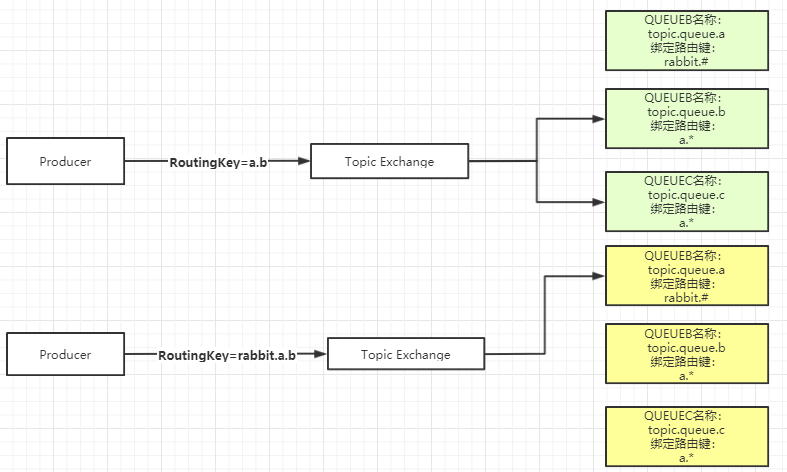
Topic Exchange 直接翻译的话叫做主题交换机,如果从用法上面翻译可能叫通配符交换机会更加贴切。
这种交换机是使用通配符去匹配,路由到对应的队列。通配符有两种:"* " 、 "#"。需要注意的是通配符前面必须要加上"."符号。
* 符号:有且只匹配一个词。比如 a.*可以匹配到"a.b"、"a.c",但是匹配不了"a.b.c"。 # 符号:匹配一个或多个词。比如"rabbit.#"既可以匹配到"rabbit.a.b"、"rabbit.a",也可以匹配到"rabbit.a.b.c"。
使用示例
在前文的基础上,新增一些内容
配置类(更新配置类以包含一个主题交换机和两个队列,以及它们的绑定)
@Configuration
public class RabbitConfig {

    // ... 其他配置 ...

    // Topic Exchange 配置
    @Bean
    public TopicExchange topicExchange() {
        return new TopicExchange("TOPIC_EXCHANGE");
    }

    @Bean
    public Queue topicQueueOneWord() {
        return new Queue("TOPIC_QUEUE_ONE_WORD");
    }

    @Bean
    public Queue topicQueueMultipleWords() {
        return new Queue("TOPIC_QUEUE_MULTIPLE_WORDS");
    }

    // 绑定键 "topic.*" 只匹配一个单词
    @Bean
    public Binding bindingTopicOneWord(Queue topicQueueOneWord, TopicExchange topicExchange) {
        return BindingBuilder.bind(topicQueueOneWord).to(topicExchange).with("topic.*");
    }

    // 绑定键 "topic.#" 匹配零个或多个单词
    @Bean
    public Binding bindingTopicMultipleWords(Queue topicQueueMultipleWords, TopicExchange topicExchange) {
        return BindingBuilder.bind(topicQueueMultipleWords).to(topicExchange).with("topic.#");
    }
}
生产者类
@Service
public class SenderService {

    // ... 其他方法 ...

    @Resource
    private RabbitTemplate rabbitTemplate;

    /**
     * 发送消息到主题交换机
     */
    public void sendToTopic(String routingKey, String message) {
        rabbitTemplate.convertAndSend("TOPIC_EXCHANGE", routingKey, message);
    }
}
消费者类
@Component
public class Receiver {

    // ... 其他方法 ...

    private static final Logger log = LoggerFactory.getLogger(Receiver.class);

    @RabbitListener(queues = {"TOPIC_QUEUE_ONE_WORD"})
    public void receiveFromTopicOneWord(Message message) {
        log.debug("Received in TOPIC_QUEUE_ONE_WORD: " + new String(message.getBody()));
    }

    @RabbitListener(queues = {"TOPIC_QUEUE_MULTIPLE_WORDS"})
    public void receiveFromTopicMultipleWords(Message message) {
        log.debug("Received in TOPIC_QUEUE_MULTIPLE_WORDS: " + new String(message.getBody()));
    }
}
测试类(发送消息并验证它们被正确路由到对应的队列:)
@SpringBootTest
public class RabbitMqTest {

    // ... 其他测试 ...

    @Autowired
    private SenderService senderService;

    @Test
    public void testTopicExchange() throws InterruptedException {
        // 发送消息,路由键匹配 "topic.*",应该只被 TOPIC_QUEUE_ONE_WORD 接收
        senderService.sendToTopic("topic.one", "Message for topic.one");

        // 发送消息,路由键匹配 "topic.#",应该被两个队列接收
        senderService.sendToTopic("topic.one.two", "Message for topic.one.two");

        // 等待一段时间以确保消息被消费
        Thread.sleep(1000);
    }
}- 第一个测试消息使用路由键 "topic.one",它符合
*的匹配规则(匹配一个单词),因此只有 "TOPIC_QUEUE_ONE_WORD" 队列接收到这个消息。 - 第二个测试消息使用路由键 "topic.one.two",它符合
#的匹配规则(匹配多个单词),因此两个队列都接收到这个消息。
运行测试后,通过日志输出可以验证这些匹配规则是否按预期工作。
小结
在 RabbitMQ中比较常用的三种模式是:直连(DirectExchange),发布订阅(FanoutExchange),通配符(TopicExchange)。
熟练运用这三种交换机类型,基本上可以解决大部分的业务场景。
通配符(TopicExchange)这种模式也可以达到直连(DirectExchange)和发布订阅(FanoutExchange)这两种的效果。
FanoutExchange不需要绑定routingKey,所以性能相对TopicExchange会好一些。
总结
交换机类型对比
| 交换机类型 | 路由依据 | 支持路由键 | 匹配方式 | 场景举例 |
|---|---|---|---|---|
| Direct Exchange | routing key | 是 | 完全匹配(binding key = routing key) | 点对点消息 |
| Topic Exchange | routing key(通配符) | 是 | 模式匹配(*、# 通配符) | 分类订阅/分组 |
| Fanout Exchange | 无 | 否 | 广播所有绑定队列 | 群发/广播 |
| Headers Exchange | header属性 | 否 | 根据消息头属性 | 高级过滤场景 |
备注:
*通配符:匹配单个词。#通配符:匹配零个或多个词。- Direct 适合精准投递,Topic 适合按主题分类,Fanout 适合全员广播,Headers 适合复杂消息属性过滤。